AI Project Notification Triage Agent
Automating Construction Project Notification Triage with AI
Aggregate and normalize alerts across your entire project stack
The agent ingests notifications from Procore, Autodesk Construction Cloud, Aconex, email, Teams, and Slack, then normalizes events into a unified schema enriched with spec sections, schedule links, and stakeholder roles.
Score priority using project context and contractual SLAs
Each notification receives a priority score based on due dates, ball-in-court ownership, float remaining, cost exposure, safety severity, and long-lead procurement risk—distinguishing true blockers from routine updates.
Route the right updates to the right roles at the right time
Policy-based routing delivers critical items instantly to the responsible party while consolidating lower-priority updates into role-specific digests, with automatic escalation when SLA timers breach.
How Cassidy automates project notifications using AI
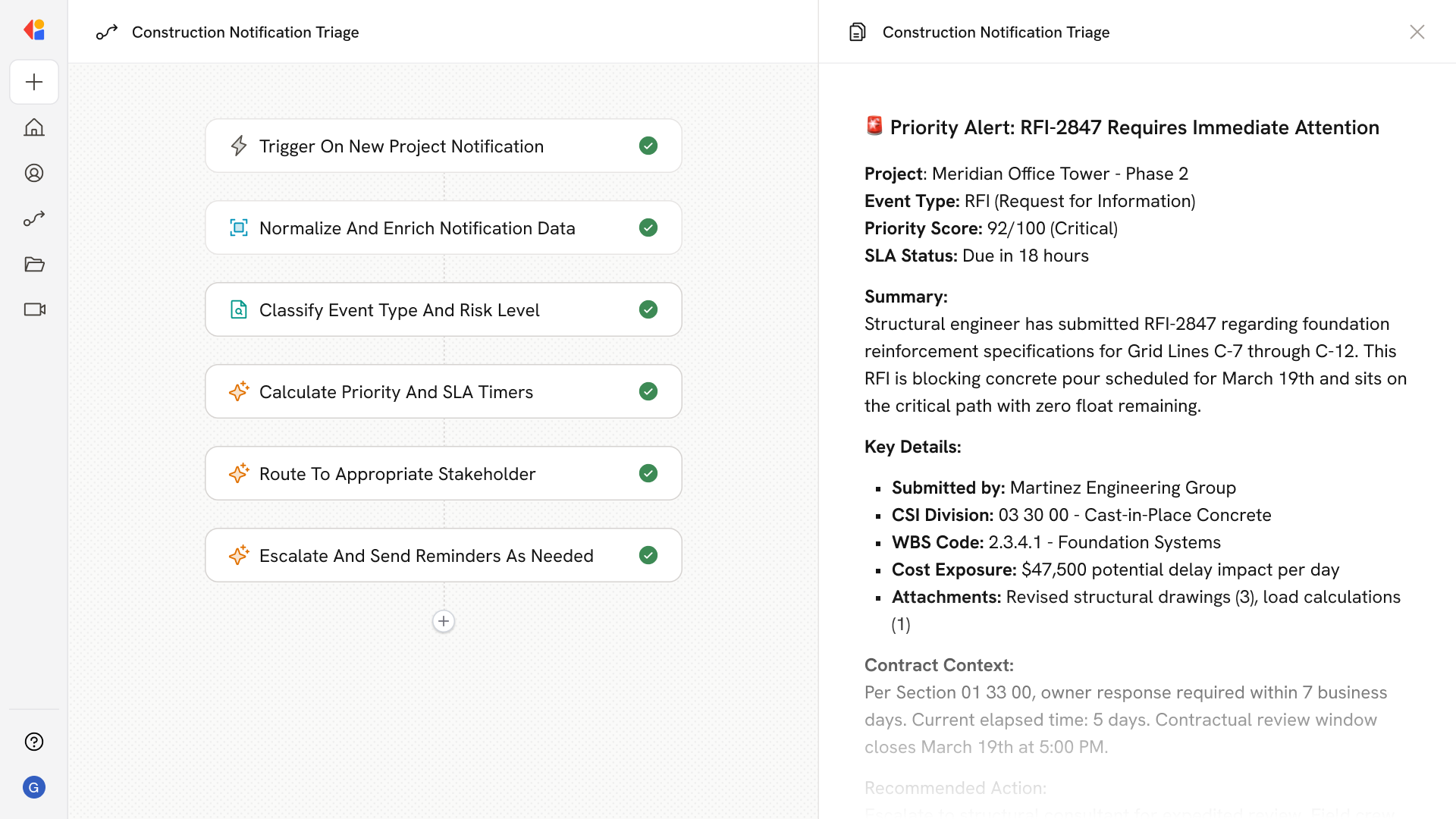
Step 1: Trigger on new project notification
The Workflow activates when a new event arrives—RFI created, submittal status changed, change event opened, safety incident logged, or schedule variance detected—via API webhooks, email parsing, or chat connectors.
Step 2: Normalize and enrich the notification
Cassidy extracts key fields (event type, due date, action required by, attachments) and enriches them with contract context, CSI spec sections, WBS cost codes, schedule activity links, and the current reviewer matrix from your Knowledge Base.
Step 3: Classify and correlate events
Using AI classification, Cassidy identifies the artifact type and risk category—distinguishing blocking RFIs from informational ones, initial submittals from resubmittals, and high-severity safety issues from routine observations—while deduplicating alerts across systems.
Step 4: Calculate priority score and SLA timers
Cassidy scores each item against configurable factors: overdue status, critical path float, cost exposure thresholds, safety severity, and contractual review windows. SLA timers begin tracking, and escalation timeouts are set based on your project's rules.
Step 5: Route to the right stakeholder
Based on role-based routing policies, Cassidy delivers the notification to the appropriate party—PM for commercial risk, Superintendent for field blockers, Safety for incidents—via their preferred channel with deep links back to Procore or ACC.
Step 6: Escalate and nudge as needed
If items approach or breach SLA deadlines, Cassidy automatically sends reminders and escalates to project leadership. Human-in-the-Loop keeps your team in control of exceptions and ensures nothing critical slips through.
Implement it inside your company
- Hands-on onboarding and support
- Self-paced training for your team
- Dedicated implementation experts
- Ongoing use case discovery
- ROI tracking & analytics dashboards
- Proven playbooks to get started fast