AI Insurance Pre-Authorization Agent
Automating Pre-Authorization with AI
Instant Coverage Requirements Discovery
The agent automatically queries payer systems at the point of order entry to determine whether prior authorization is required, surfacing policy rules, documentation needs, and benefit limits before staff spend time on unnecessary submissions.
Intelligent Documentation Assembly
AI-driven forms auto-populate clinical evidence from EHR data—diagnoses, lab results, imaging reports—prompting users only for what's missing and aligning terminology to payer-specific requirements to reduce denials.
Real-Time Decisions and Status Visibility
Submissions flow directly to payer utilization management systems via FHIR PAS, returning approvals, PA numbers, and status updates within the workflow so scheduling and claims proceed without manual follow-up.
How Cassidy automates this using AI
Step 1: Trigger on order entry
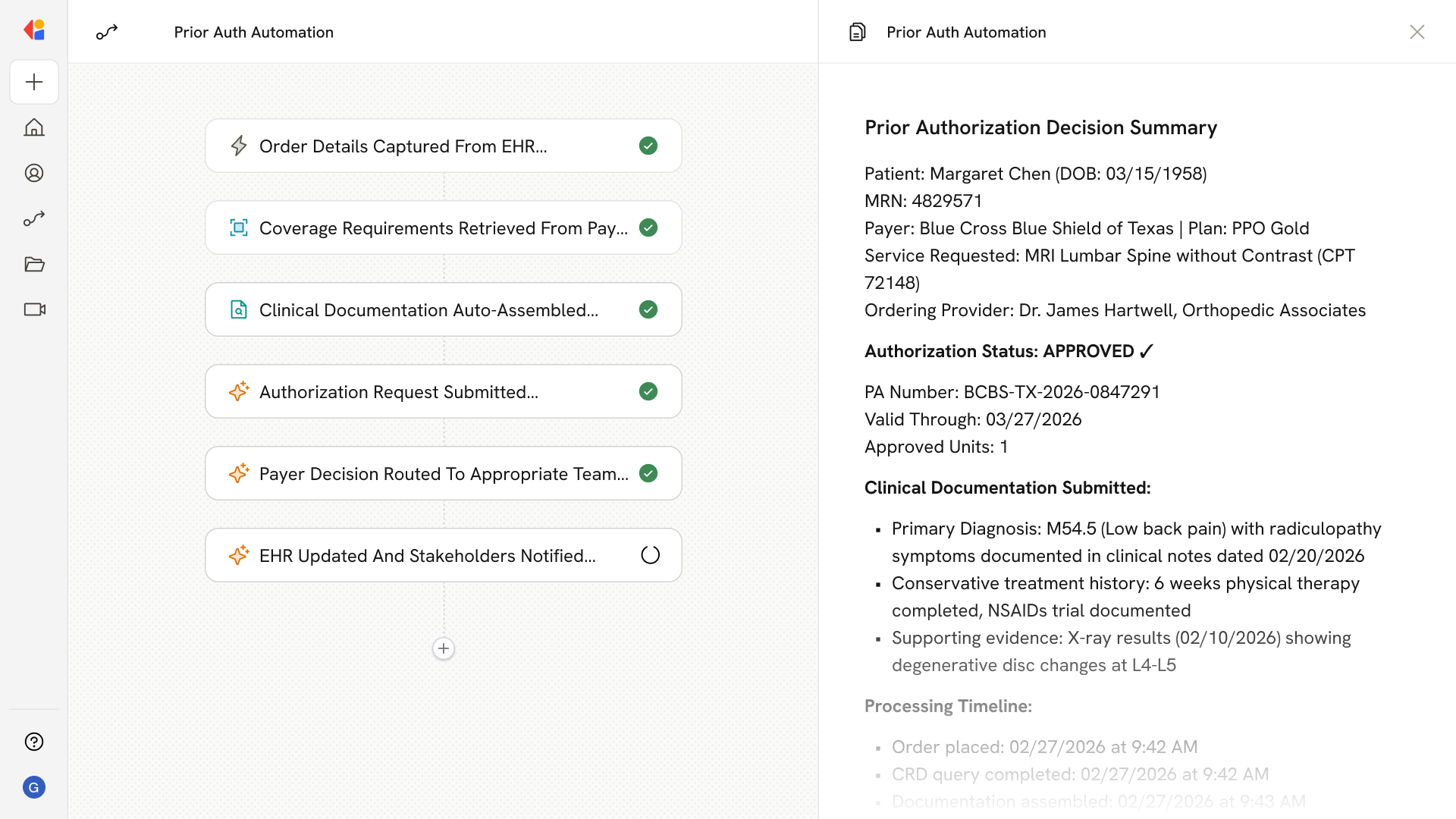
The Workflow activates automatically when a provider places an order in the EHR—whether for imaging, procedures, DME, or referrals—capturing patient demographics, coverage details, diagnosis codes, and procedure codes.
Step 2: Query coverage requirements
Cassidy calls the payer's Coverage Requirements Discovery (CRD) service, interpreting the response to determine if prior authorization is required and what documentation the payer needs for the specific member, plan, and service.
Step 3: Assemble clinical documentation
Using Documentation Templates and Rules (DTR) logic, Cassidy searches the Knowledge Base and connected EHR systems to auto-populate questionnaires with existing clinical evidence—vitals, diagnoses, imaging results, clinical notes—flagging only missing elements for staff review.
Step 4: Submit authorization request
Cassidy constructs a compliant PAS bundle containing patient, provider, service, and clinical attachment data, then submits it to the payer's Prior Authorization API for real-time adjudication.
Step 5: Monitor and route decisions
The Workflow tracks payer responses—approved, pended, or denied—and routes outcomes accordingly: approvals push PA numbers to scheduling and claims, pended requests trigger automated retrieval of additional documentation, and denials surface for staff review with denial reason codes.
Step 6: Update systems and notify stakeholders
Cassidy writes the authorization status and PA number back to the EHR, notifies relevant team members via Slack or Teams, and logs a complete audit trail for compliance and reporting.
Implement it inside your company
- Hands-on onboarding and support
- Self-paced training for your team
- Dedicated implementation experts
- Ongoing use case discovery
- ROI tracking & analytics dashboards
- Proven playbooks to get started fast