Employee Benefits Census Generator
What does this mean?
HR and benefits teams finalize renewals faster with fewer corrections, improving accuracy, audit readiness, and reducing back-andth with carriers and brokers.
How it works?
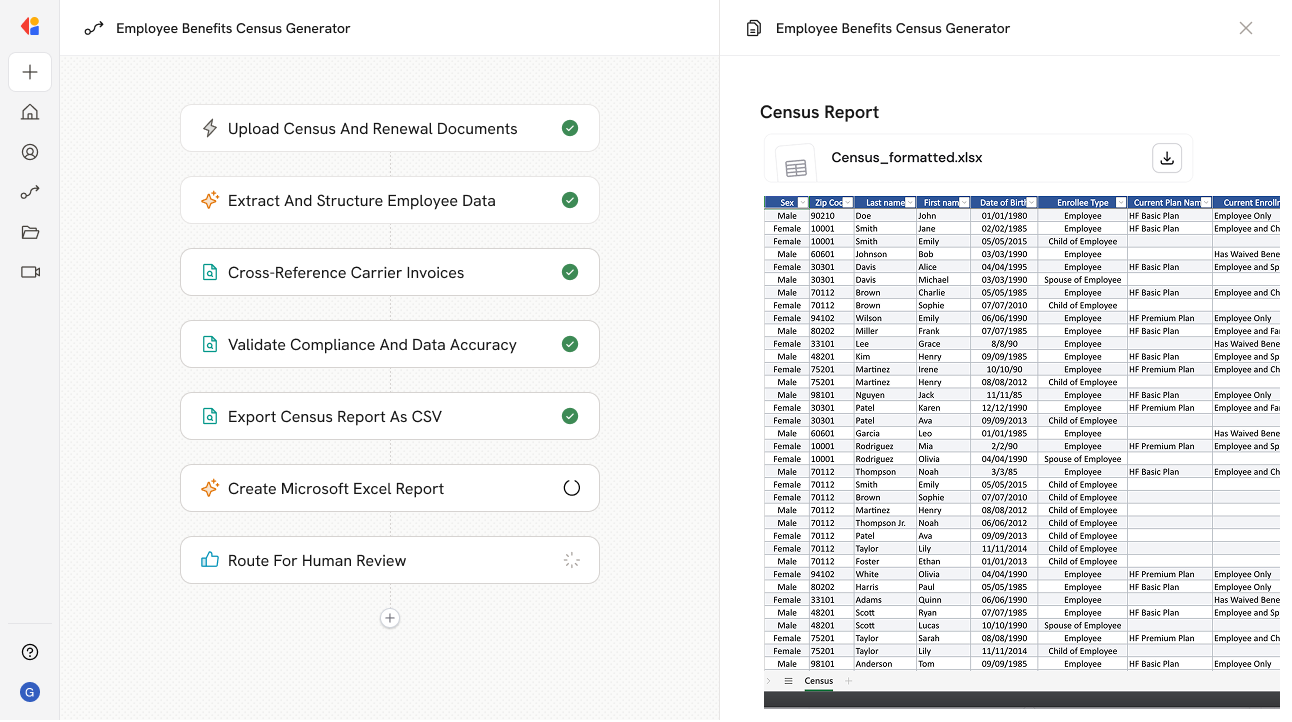
Ingests employee census spreadsheets, carrier invoices, and renewal documents, validates fields and compliance rules, then produces a complete health benefits census report with source-linked entries and error flags.
Workflow steps
Step 1: Upload census and renewal documents
The Workflow begins with a manual trigger where HR or benefits team members upload employee census spreadsheets, carrier invoices, and renewal documents as inputs.
Step 2: Extract and structure employee data
Cassidy ingests the uploaded files and uses a Generate Text with Cassidy Assistant action to parse employee census spreadsheets, pulling key fields like names, dates of birth, plan selections, and dependent information into a structured format.
Step 3: Cross-reference carrier invoices
The Workflow compares extracted census data against carrier invoice details to identify discrepancies in enrollment counts, premium amounts, or coverage tiers that could cause billing issues.
Step 4: Validate compliance and data accuracy
Using your company's compliance rules stored in the Knowledge Base, Cassidy checks each entry for missing fields, formatting errors, and policy violations—flagging any issues that need attention.
Step 5: Generate comprehensive census report
The Workflow compiles all validated data into a complete health benefits census report, with source-linked entries so every data point traces back to its original document.
Step 6: Route for human review
The draft report—complete with error flags and validation notes—is sent to a team member via Request Input from Team for final review before distribution to carriers or brokers.
Step 7: Export final deliverable
Once approved, the Workflow uses Export as a Microsoft Word document to create a polished, audit-ready census report formatted for carrier submission or internal records.
Implement it inside your company
- Hands-on onboarding and support
- Self-paced training for your team
- Dedicated implementation experts
- Ongoing use case discovery
- ROI tracking & analytics dashboards
- Proven playbooks to get started fast