Employee Enrollment Reconciliation & Scoring
What does this mean?
Benefits and HR teams can correct coverage quickly, reduce billing errors, and ensure accurate enrollment data without manual cross-checks.
How it works?
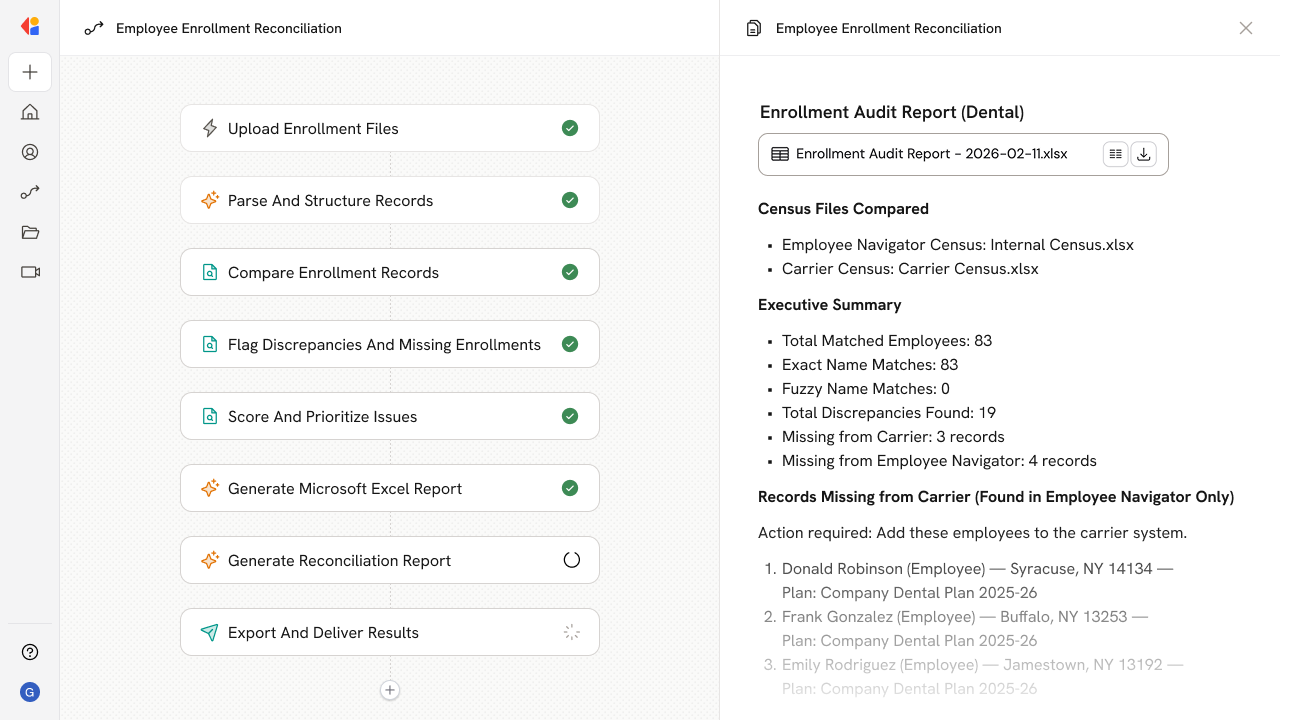
Compares employee enrollment records from carrier files and internal HR/benefits systems, flags matches and discrepancies, and produces a scored report of missing or mismatched enrollments with source references.
Workflow steps
Step 1: Upload enrollment files
The Workflow begins with a Manual trigger where a team member uploads the carrier enrollment file and the internal HR/benefits system export for comparison.
Step 2: Parse and structure records
Cassidy extracts employee enrollment data from both files, normalizing fields like employee ID, name, plan type, coverage dates, and dependent information into a consistent format.
Step 3: Compare enrollment records
The Workflow cross-references each employee record between the carrier file and internal system, checking for exact matches, partial matches, and records that exist in one source but not the other.
Step 4: Flag discrepancies and missing enrollments
Using Paths, Cassidy categorizes each record: confirmed matches, mismatched data (e.g., wrong plan or coverage dates), employees missing from the carrier file, and carrier records with no internal match.
Step 5: Score and prioritize issues
Each discrepancy is scored based on severity—missing enrollments and billing-impacting errors rank highest, while minor data mismatches are flagged for review but deprioritized.
Step 6: Generate reconciliation report
The Generate Text with Cassidy Assistant action compiles findings into a structured report with source references, showing exactly where each discrepancy originated and recommended next steps.
Step 7: Export and deliver results
The Workflow exports the scored reconciliation report as a Microsoft Word document and sends it via email to the Benefits or HR team for action.
Implement it inside your company
- Hands-on onboarding and support
- Self-paced training for your team
- Dedicated implementation experts
- Ongoing use case discovery
- ROI tracking & analytics dashboards
- Proven playbooks to get started fast