AI Patient Message Routing Agent
Automating Patient Message Routing with AI
Classify intent and map to EHR workflows
The agent analyzes inbound portal and SMS messages, identifies patient intent (medical advice, refills, scheduling, billing), and maps each request to the appropriate In Basket folder or operational pool—eliminating manual sorting and misfiled messages.
Prioritize urgent cases with acuity detection
NLP models flag red-flag symptoms like chest pain or syncope, scoring messages on an acuity scale and surfacing high-priority items at the top of clinician worklists so urgent needs get attention first.
Route to the right team with guardrails in place
Messages flow automatically to RN triage pods, refill pools, scheduling queues, or specialty teams based on intent, care team assignment, and coverage rules—with Human-in-the-Loop review ensuring clinical decisions stay with clinicians.
How Cassidy automates this using AI
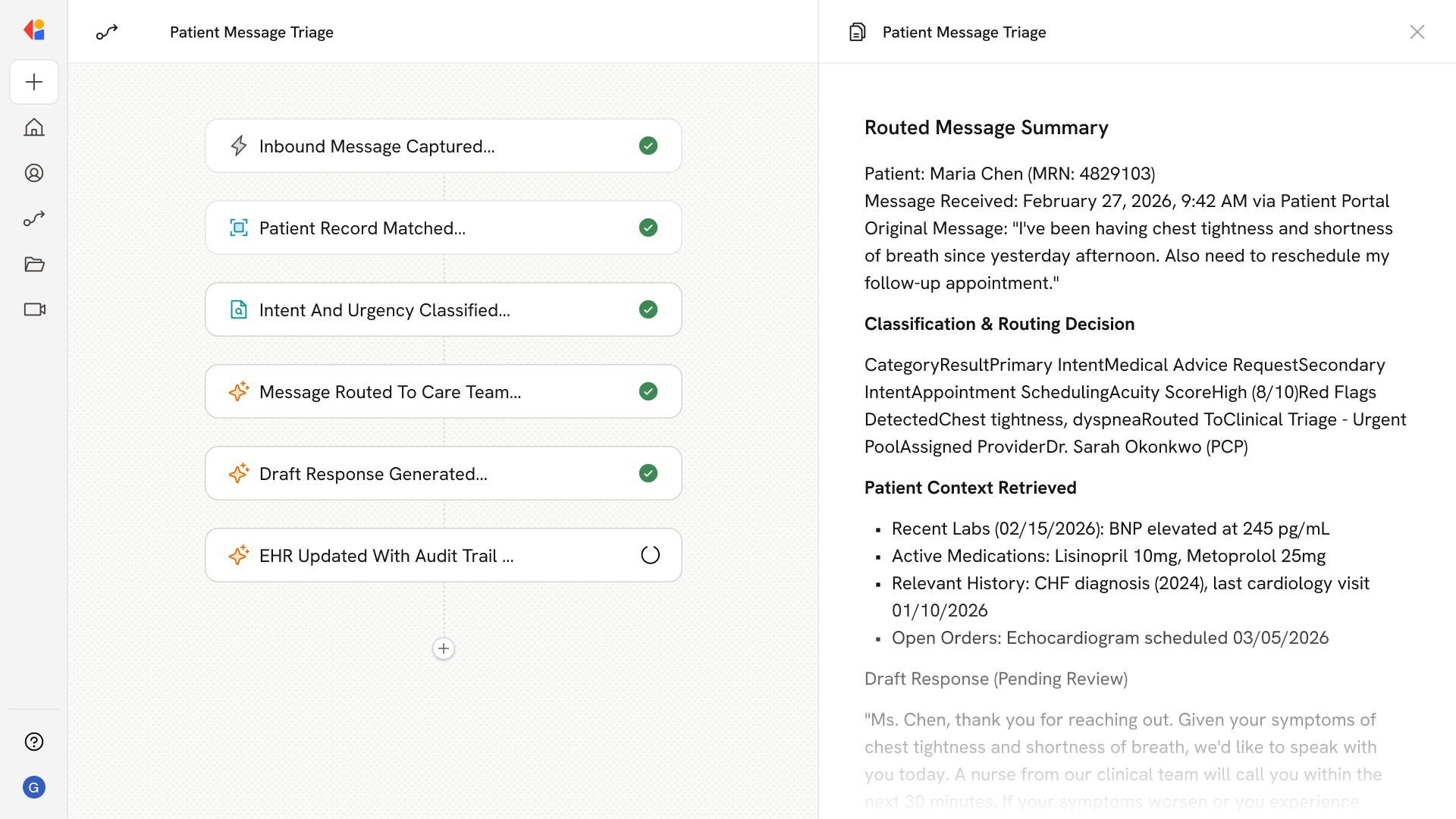
Step 1: Trigger on inbound patient message
The Workflow activates when a new message arrives via patient portal, SMS, or other connected channel, capturing the full message content and any attachments.
Step 2: Resolve patient identity and context
Cassidy matches the message to the correct patient record using EHR integrations (FHIR/HL7), attaches it to the appropriate chart, and pulls relevant context like recent labs, medications, and open orders.
Step 3: Classify intent and detect acuity
The AI Agent analyzes message content to classify intent (medical advice request, refill, scheduling, billing inquiry) and scans for urgent symptoms or red flags, assigning an acuity score that determines prioritization.
Step 4: Route to the appropriate pool or team
Based on intent classification, acuity level, patient's care team, and department coverage rules, Cassidy routes the message to the correct In Basket folder or operational pool—clinical triage, refills, scheduling, or specialty queues.
Step 5: Generate draft response for review
For routine requests, Cassidy drafts a reply using your approved templates and Knowledge Base content, ready for staff review and send—accelerating response times while keeping humans in control.
Step 6: Log actions and update the EHR
Every classification, routing decision, and response is logged with full audit trails for HIPAA compliance, and the EHR is updated with resolution status, follow-up tasks, and any triggered care gap workflows.
Implement it inside your company
- Hands-on onboarding and support
- Self-paced training for your team
- Dedicated implementation experts
- Ongoing use case discovery
- ROI tracking & analytics dashboards
- Proven playbooks to get started fast