AI FNOL Intake Agent
Automating FNOL Claims Intake with AI
24/7 Omnichannel Intake Without the Queue
An AI intake agent handles voice, chat, and web submissions around the clock, verifying identity and policy status in real time so claimants never wait on hold during CAT surges or after hours.
Structured Data Capture That Eliminates Rework
Guided, conditional questioning captures only the relevant fields for each line of business, validates inputs live against policy data, and maps directly to ACORD standards—reducing callbacks and downstream delays.
Intelligent Triage and Routing to the Right Adjuster
Automated severity scoring and coverage checks route claims to fast-track queues or specialized teams, set initial reserves, and flag potential fraud—all before a human touches the file.
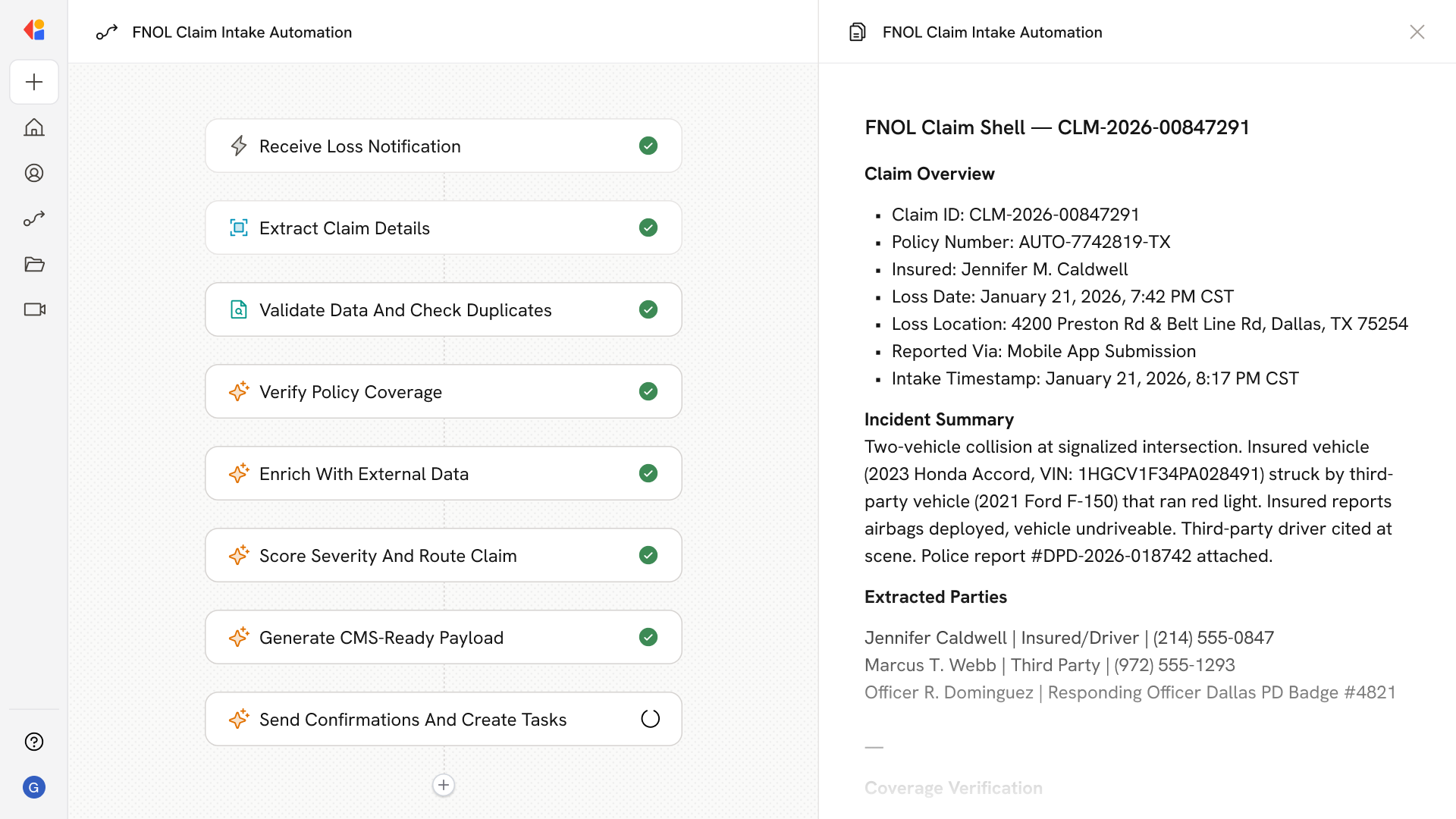
How Cassidy automates FNOL Claims Intake using AI
Step 1: Trigger on new loss report
The Workflow activates when a claimant initiates contact—whether through an AI voice agent, chat, SMS, or web form—and immediately begins identity verification and policy lookup via your PAS/CRM.
Step 2: Capture and validate claim details
Cassidy guides the claimant through a dynamic, LOB-specific interview, extracting structured data (incident date, location, parties involved, damage description) and validating each field in real time against policy terms and coverage dates.
Step 3: Ingest evidence and documentation
The Agent sends secure links for photo, video, and document uploads. Cassidy extracts metadata, runs OCR on police reports or receipts, and attaches everything to the claim record with full audit trails.
Step 4: Score severity and screen for fraud
Rules and ML models assess claim complexity, coverage likelihood, and fraud risk. High-severity or flagged claims route to SIU or senior adjusters; low-complexity claims move to fast-track queues.
Step 5: Create claim and launch downstream Workflows
Cassidy auto-creates the claim and exposures in your claims management system, sets initial reserves, opens tasks and SLA timers, and triggers vendor dispatch or appraisal Workflows as needed.
Step 6: Confirm and communicate with the claimant
The claimant receives instant acknowledgement with their claim number, next steps, and a checklist of any required documents. Proactive status updates flow via SMS, email, or app—with Human-in-the-Loop escalation for sensitive cases.
Implement it inside your company
- Hands-on onboarding and support
- Self-paced training for your team
- Dedicated implementation experts
- Ongoing use case discovery
- ROI tracking & analytics dashboards
- Proven playbooks to get started fast