AI PEO Ticket Routing Agent
Automating PEO Support Ticket Triage with AI
Intelligent Classification Across HR Service Domains
The agent analyzes incoming tickets to detect intent—whether payroll discrepancies, benefits questions, workers' comp incidents, or compliance inquiries—and maps each case to the appropriate HR Service Type and COE.
Skills-Based Routing with Compliance Guardrails
Automated routing matches cases to specialists based on skills, certifications, jurisdiction expertise, and real-time capacity while enforcing data partitioning, RBAC, and audit controls for sensitive PII/PHI.
Priority and SLA Assignment That Reflects Business Impact
The system evaluates urgency signals—payroll cutoffs, compliance deadlines, sentiment, and VIP flags—to assign priority and attach SLA policies by client tier, so time-critical issues reach the right queue immediately.
How Cassidy automates --header-using-ai
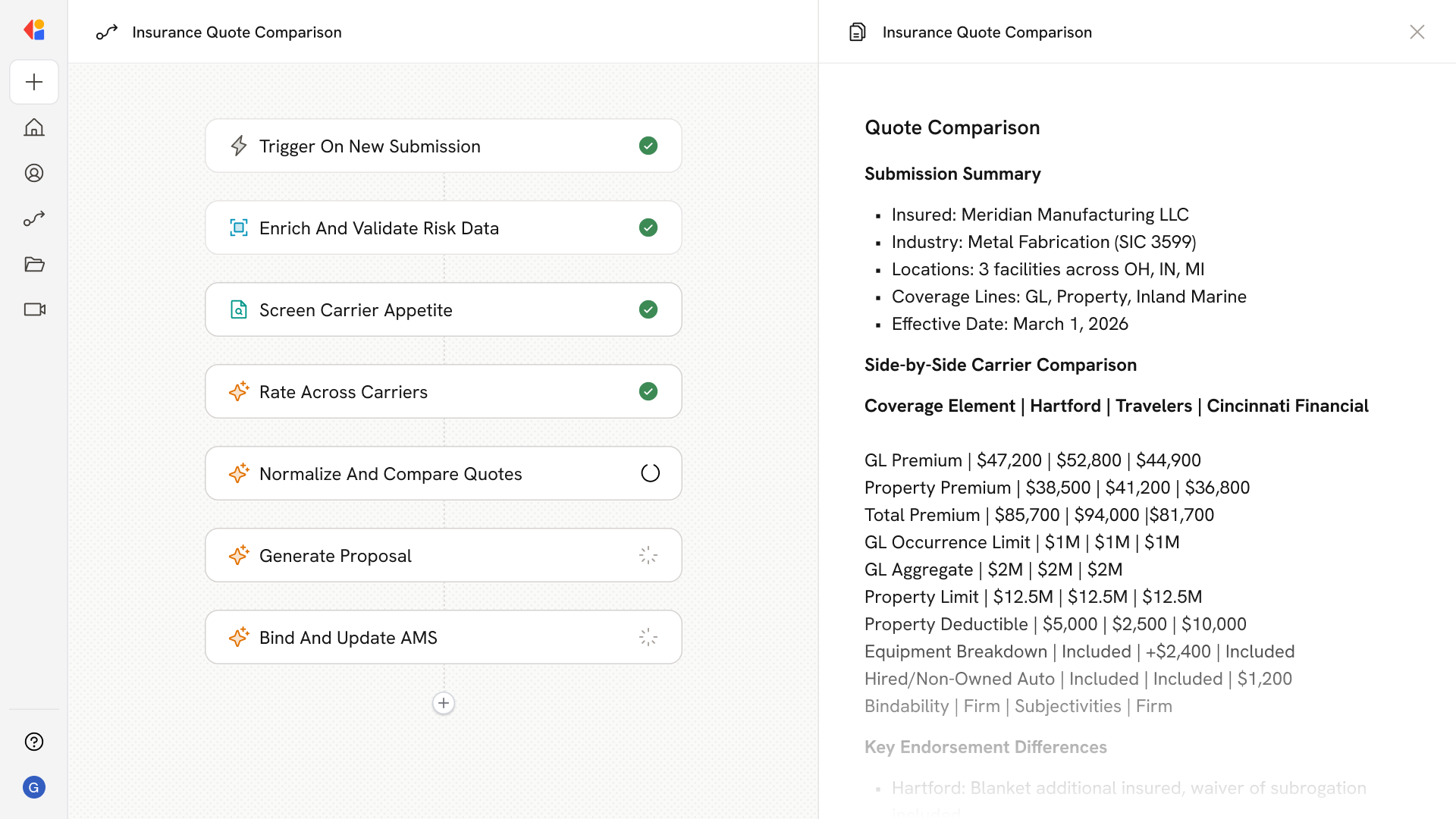
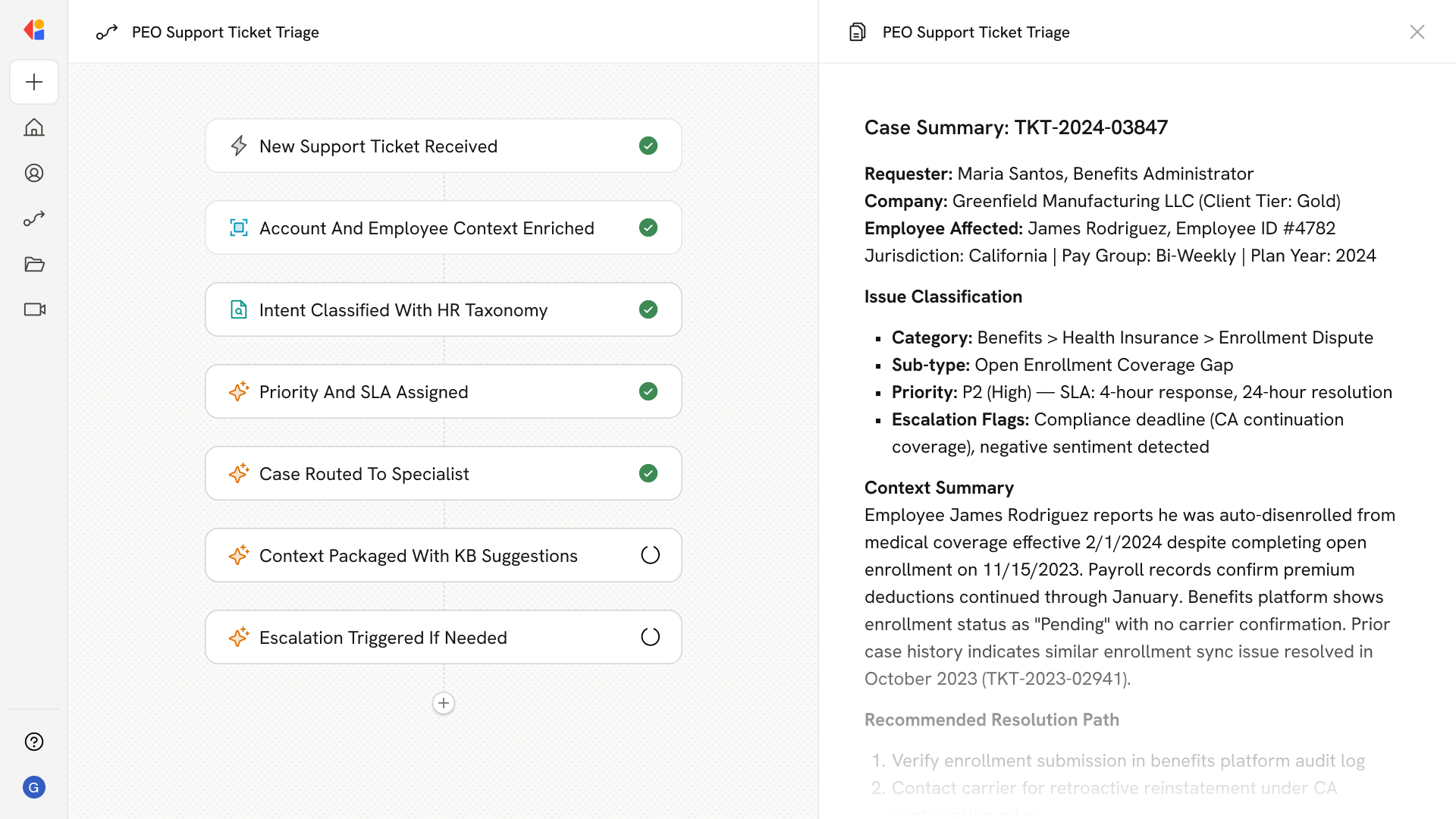
Step 1: Trigger on new support ticket
The Workflow activates when a ticket arrives from any channel—client portal, email, chat, or API—and normalizes the case with requester, company, employee, and metadata like state, FEIN, and plan year.
Step 2: Enrich with account and employee context
Cassidy pulls related context from your HRIS, payroll system, and benefits platform—recent pay runs, open enrollment status, prior case history, client tier SLAs, and workers' comp policies—to inform routing decisions.
Step 3: Classify intent and apply HR taxonomy
Using your Knowledge Base and service catalog, Cassidy classifies the ticket into your HR service taxonomy (payroll, benefits, leaves, workers' comp, compliance) and auto-tags jurisdiction, pay group, plan year, and issue type.
Step 4: Determine priority and attach SLA
Cassidy evaluates impact signals—payroll blocking issues, OSHA recordables, compliance deadlines, negative sentiment, executive handling—and assigns priority (P1–P4) with the appropriate SLA based on service type and client contract.
Step 5: Route to the right specialist or queue
The Workflow matches the case to the appropriate COE queue or specialist using skills-based routing—factoring in certifications (multi-state payroll, ACA/COBRA, state-specific workers' comp), language, workload, and shift coverage.
Step 6: Package context and surface knowledge
Cassidy compiles a case summary with enriched context and suggests relevant KB articles or guided flows. For common requests like ID card reissues or paystub access, it can trigger automated resolution paths with full audit trails.
Step 7: Escalate or swarm when needed
If the case requires cross-COE collaboration or hits escalation thresholds—time-based, compliance-triggered, or sentiment-driven—Cassidy spins up swarming with a single owning case or routes to senior specialists and restricted queues for ER/Legal matters.
Implement it inside your company
- Hands-on onboarding and support
- Self-paced training for your team
- Dedicated implementation experts
- Ongoing use case discovery
- ROI tracking & analytics dashboards
- Proven playbooks to get started fast