AI Manufacturing Incident Alert Routing Agent
Automating Manufacturing Incident Alert Routing with AI
Eliminate Alarm Noise and Floods
The agent normalizes signals from SCADA, DCS, and PLC sources, then deduplicates chattering alarms and correlates cascading events into single actionable incidents—cutting through the noise that overwhelms operators.
Route to the Right Responder, Every Time
AI-driven routing matches incident type, asset criticality, and priority to the correct on-call technician by craft and shift, with automatic escalation when acknowledgments are missed.
Auto-Create CMMS Work Orders with Full Context
Qualified incidents automatically generate work orders in your EAM system—prefilled with asset ID, failure class, checklists, and sensor context—so technicians arrive prepared and MTTR drops.
How Cassidy automates using AI
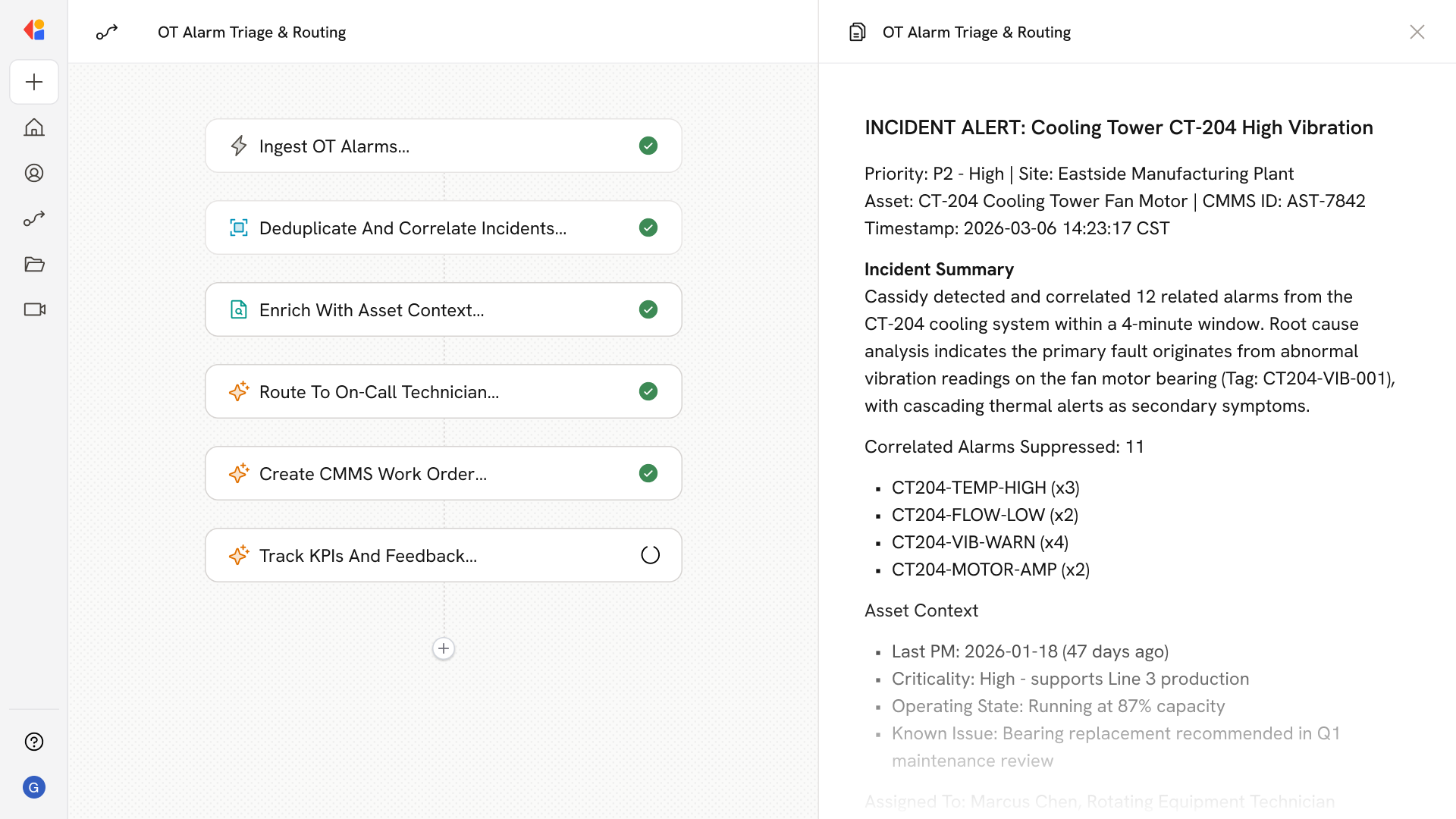
Step 1: Ingest and normalize OT alarms
The Workflow triggers when alarms arrive from SCADA, DCS, PLCs, or historian systems via OPC UA, MQTT, or webhooks. Cassidy normalizes each signal to a common schema—timestamp, asset, tag, priority, condition, and site hierarchy—and maps tags to your CMMS asset IDs.
Step 2: Deduplicate and correlate incidents
Cassidy collapses repeated alarms within configurable time windows, detects chattering signals, and groups related alarms by asset topology and process causality. Cascading alarms roll up into a single parent incident with the root cause flagged.
Step 3: Enrich with asset and operating context
The Workflow pulls context from your Knowledge Base—asset criticality, last maintenance date, operating state, and relevant SOPs—so responders receive actionable intelligence, not raw alarm data.
Step 4: Route and escalate to on-call
Cassidy matches the incident to the right on-call technician based on craft, shift, and asset class. Notifications push via mobile, SMS, or voice with embedded runbook links and LOTO prompts. If no acknowledgment arrives within your SLA, Cassidy auto-escalates to secondary responders and supervisors.
Step 5: Auto-create CMMS work order
For qualified incidents, Cassidy opens a work order in Maximo, SAP PM, MaintainX, or your EAM—prefilled with asset, location, priority, failure codes, and checklists. Bi-directional sync suppresses further paging once the WO is in progress and auto-closes the incident when work completes.
Step 6: Capture feedback and track KPIs
Technicians log notes on true/false positives and actual cause. Cassidy tracks MTTA, MTTR, alarm flood frequency, and bad-actor trends—feeding continuous improvement and alarm rationalization reviews.
Implement it inside your company
- Hands-on onboarding and support
- Self-paced training for your team
- Dedicated implementation experts
- Ongoing use case discovery
- ROI tracking & analytics dashboards
- Proven playbooks to get started fast