AI HR Policy Search Agent
Automating HR Policy Search with AI
Cited, Role-Aware Answers Where Employees Work
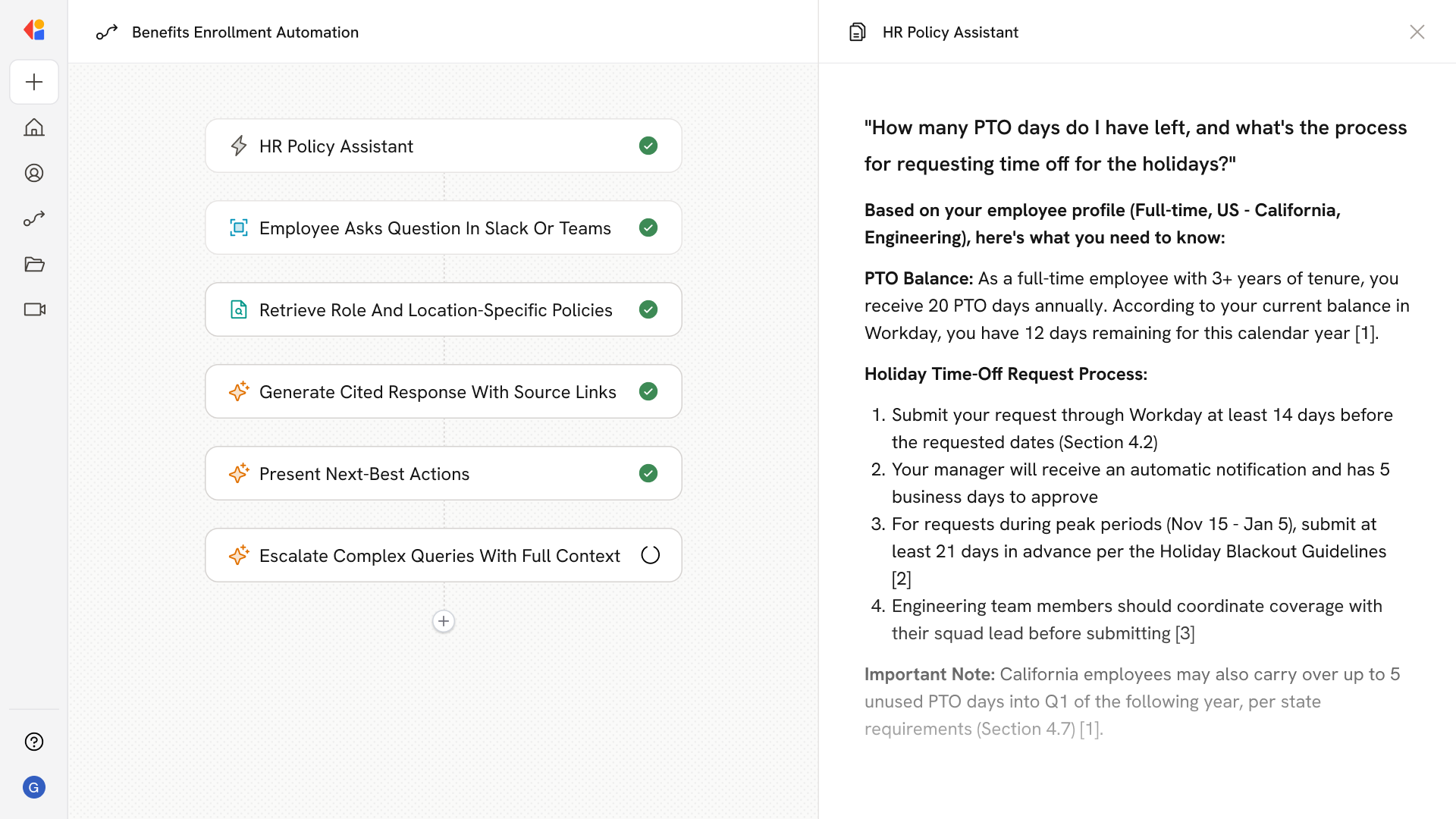
The agent delivers grounded responses with inline citations, page numbers, and effective dates—filtered by each employee's location, job level, and employment class—directly in Slack or Microsoft Teams.
Governed Retrieval That Earns Trust
Hybrid search combines keyword and semantic retrieval with RBAC/ABAC controls, ensuring employees see only the policies they're authorized to access while confidence thresholds prevent hallucinations on ambiguous queries.
From Answer to Action in One Flow
Beyond answering questions, the system offers next-best actions—buttons to start PTO requests, initiate leave workflows, or open an HR case with full conversation context and audit trails attached.
How Cassidy automates--header-using-ai
Step 1: Sync HR Knowledge to the Knowledge Base
Cassidy connects to SharePoint, Google Drive, Confluence, and uploaded PDFs to continuously ingest handbooks, benefits guides, and policy documents—preserving structure, metadata, and effective dates so answers stay current.
Step 2: Trigger on Employee Question
The Workflow activates when an employee asks a natural-language question in Slack or Microsoft Teams, capturing their query along with profile attributes like location, employment type, and business unit.
Step 3: Retrieve and Filter Relevant Policies
Cassidy searches the Knowledge Base using hybrid retrieval, then applies role and location filters to surface only the policies that apply to that specific employee—whether they're a California FTE, a German contractor, or a Toronto-based union member.
Step 4: Generate Cited, Grounded Response
The Agent drafts an answer constrained to retrieved sources, embedding inline citations with section numbers, effective dates, and deep links back to the source document so employees can verify and explore further.
Step 5: Offer Next-Best Actions
Alongside the answer, Cassidy presents actionable buttons—start a PTO request, initiate an LOA workflow, enroll in benefits, or submit an expense—connecting directly to your HRIS or ITSM system.
Step 6: Escalate with Full Context
When confidence is low or the query involves sensitive matters, Cassidy opens a case in ServiceNow, Jira, or your HR system—attaching the conversation transcript, retrieved citations, and employee attributes so HR can resolve it with full context and audit trails.
Implement it inside your company
- Hands-on onboarding and support
- Self-paced training for your team
- Dedicated implementation experts
- Ongoing use case discovery
- ROI tracking & analytics dashboards
- Proven playbooks to get started fast