AI Estimate Validation Agent
Automating Historical Estimate Validation with AI
Benchmark Against Internal History and Industry Standards
The agent compares current unit rates (MH/LF, $/LB, cost per fixture) against historical job-cost actuals and industry references like MCAA WebLEM labor units, stratified by material, size, join method, and site conditions.
Flag Outliers Before They Become Problems
Statistical analysis identifies lines that fall outside control limits—whether a copper piping rate that's 40% above P75 or duct labor that doesn't account for elevation factors—and surfaces them with context for rapid review.
Catch Scope Gaps Automatically
Automated QA checklists verify that commonly missed items—hangers, seismic bracing, sleeves, hydrostatic testing, TAB, and commissioning—appear with reasonable quantities, reducing the risk of costly omissions at buyout.
How Cassidy automates estimate validation using AI
Step 1: Ingest estimate and cost history
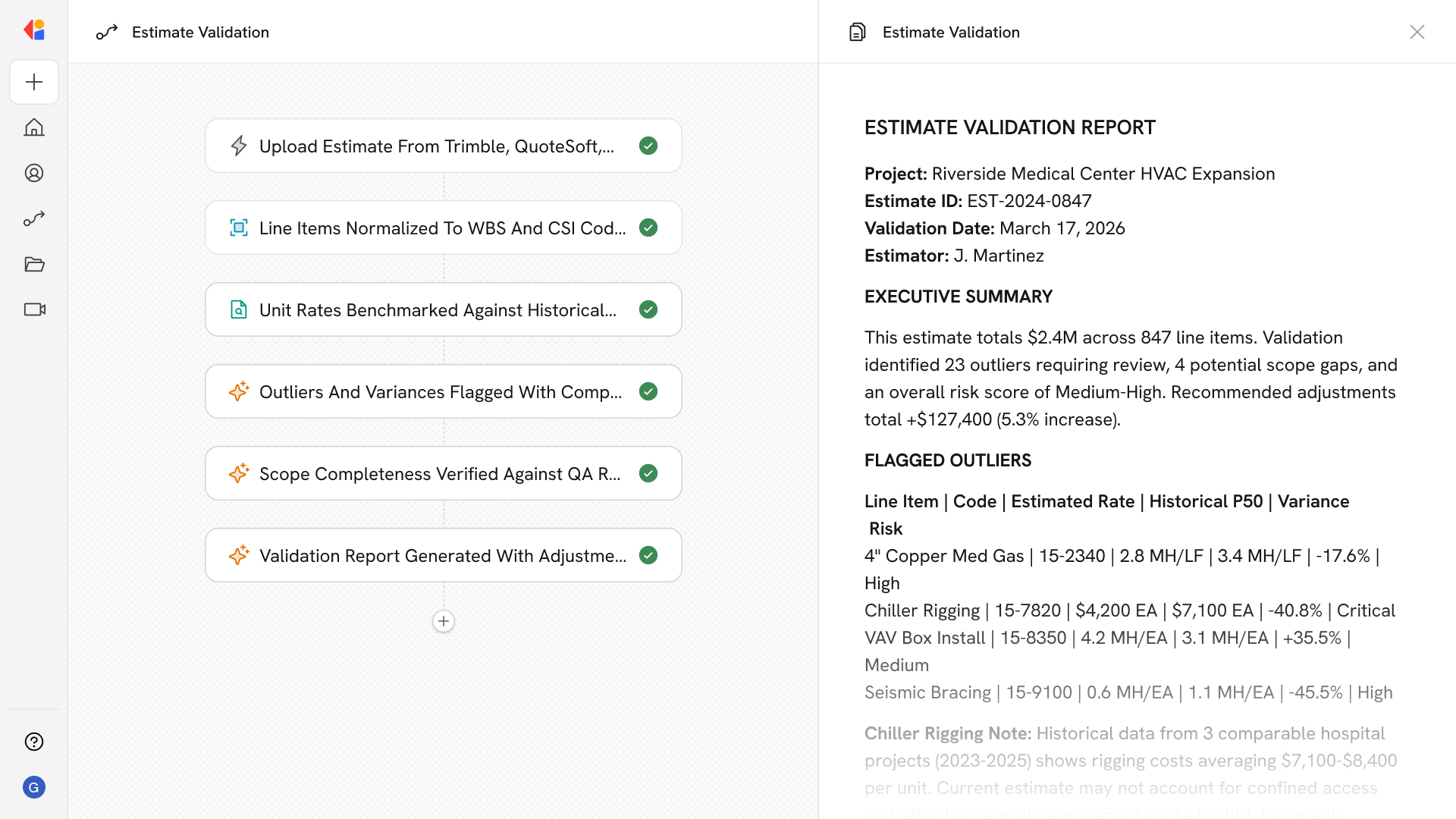
The Workflow triggers when a new estimate is uploaded or synced from your estimating platform (Trimble, QuoteSoft, FastEST). Cassidy pulls the estimate data alongside historical job-cost actuals from your ERP, normalizing everything to a unified cost-code structure.
Step 2: Normalize and enrich line items
Cassidy maps each line to your WBS and CSI MasterFormat codes, standardizes units (LF, LB, EA), and tags attributes like system type, material, size, join method, prefab vs. field, and install conditions.
Step 3: Build and apply benchmarks
The Agent computes unit rates from your current estimate and compares them against historical P25/P50/P75 bands, MCAA WebLEM labor units, and RSMeans references—adjusting for project type, location factors, and site-specific conditions.
Step 4: Detect outliers and variances
Using statistical thresholds and peer-group matching, Cassidy flags lines where MH/unit or $/unit falls outside expected ranges, providing variance magnitude and comparable historical data for each flagged item.
Step 5: Run scope completeness checks
Automated QA rules verify that standard mechanical scope elements are present—valves per LF, hangers proportional to pipe runs, seismic bracing, testing allowances, rigging, and commissioning—and flags likely omissions.
Step 6: Generate validation report
Cassidy compiles a validation package with flagged outliers, suggested adjustments, scope gap findings, and a risk register. The report routes to estimators for review, with approval workflows that log decisions and update the estimate via API.
Implement it inside your company
- Hands-on onboarding and support
- Self-paced training for your team
- Dedicated implementation experts
- Ongoing use case discovery
- ROI tracking & analytics dashboards
- Proven playbooks to get started fast