AI Client Communication Drafting Agent
Automating Consulting Client Email Drafting with AI
CRM-Aware Draft Generation
The agent pulls account context, contact details, opportunity stage, and recent meeting notes directly from your CRM to compose personalized emails that reflect the full relationship history—no tab-switching or copy-pasting required.
Brand Governance Built In
Every draft draws from approved templates, tone-of-voice guidelines, and compliant snippets, automatically enforcing your firm's lexicon, disclaimers, and signature standards while flagging sensitive claims for review.
Streamlined Approval and Logging
Automated routing sends drafts to the right reviewers—manager, legal, or brand—based on account tier and content risk, then logs the final email to the correct CRM records with a complete audit trail.
How Cassidy automates using AI
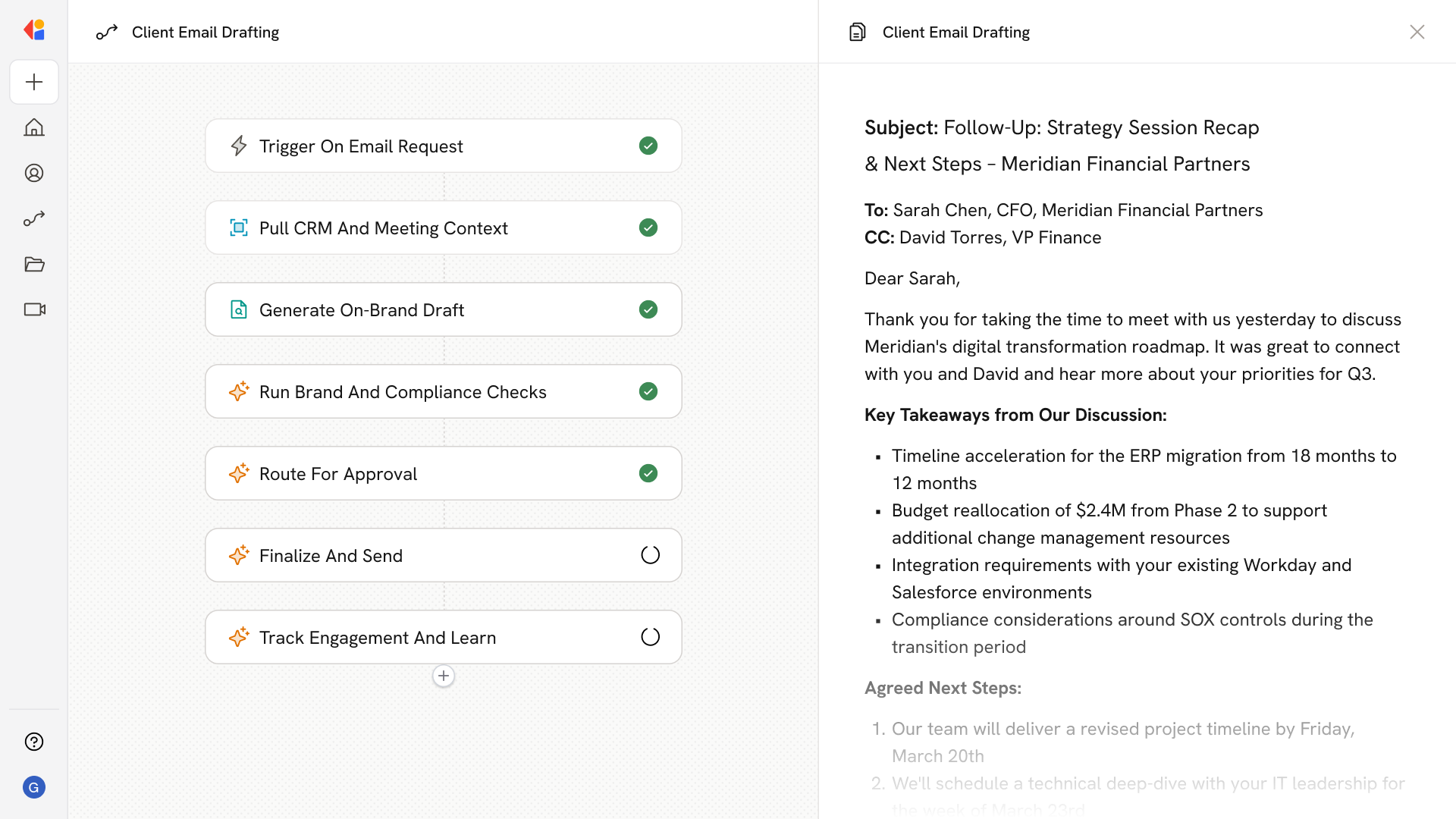
Step 1: Trigger on email request
The Workflow activates when a relationship manager initiates a client communication—selecting the use case (meeting recap, QBR invite, proposal transmittal, or renewal notice) and specifying recipients from the CRM.
Step 2: Pull CRM and meeting context
Cassidy retrieves account details, contact roles, opportunity stage, renewal dates, health scores, and recent meeting notes or action items from your CRM to inform the draft.
Step 3: Generate on-brand draft
Using your Knowledge Base of approved templates, tone presets, and compliance snippets, Cassidy assembles a personalized email with correct merge fields, disclaimers, and signature—flagging any missing data for the RM to complete.
Step 4: Run brand and compliance checks
The draft passes through automated guardrails: banned-word detection, tone-of-voice linting, link validation, and sensitive-claim flagging to ensure brand consistency and reduce review cycles.
Step 5: Route for approval
Cassidy sends the draft to the appropriate reviewers—practice lead, legal, or brand—based on your approval matrix, enabling parallel reviews with tracked changes and an audit trail.
Step 6: Finalize and send
Once approved, the email is inserted into Outlook or Gmail via Cassidy's Extensions, preserving threading and attaching relevant files. The message is automatically logged to the correct Account, Contact, and Opportunity in your CRM.
Step 7: Track engagement and learn
Cassidy monitors replies, meeting bookings, and bounce handling, feeding performance data back into dashboards so you can refine templates, tighten approval SLAs, and improve future communications.
Implement it inside your company
- Hands-on onboarding and support
- Self-paced training for your team
- Dedicated implementation experts
- Ongoing use case discovery
- ROI tracking & analytics dashboards
- Proven playbooks to get started fast