AI Change Order Letter Drafting Agent
Automating Change Order Letter Drafting with AI
Contract-Compliant Documentation from Day One
The agent maps every scope element to specific AIA A201 clauses and underlying documents—RFIs, ASIs, CCDs, bulletins, and spec sections—ensuring each change order package meets contractual notice requirements and stands up to audit.
Pricing and Schedule Impact Built In
Automated workflows compile labor, equipment, materials, and subcontractor quotes into detailed cost breakdowns with OH&P markups per contract caps, while generating fragnet-based schedule impact narratives tied to critical path activities.
E-Sign Routing with Full Audit Trail
Once the AIA G701 form and supporting exhibits are assembled, the system routes for electronic signatures in the correct sequence—Architect, Contractor, Owner—capturing timestamps and version control for a complete approval record.
How Cassidy automates change order documentation using AI
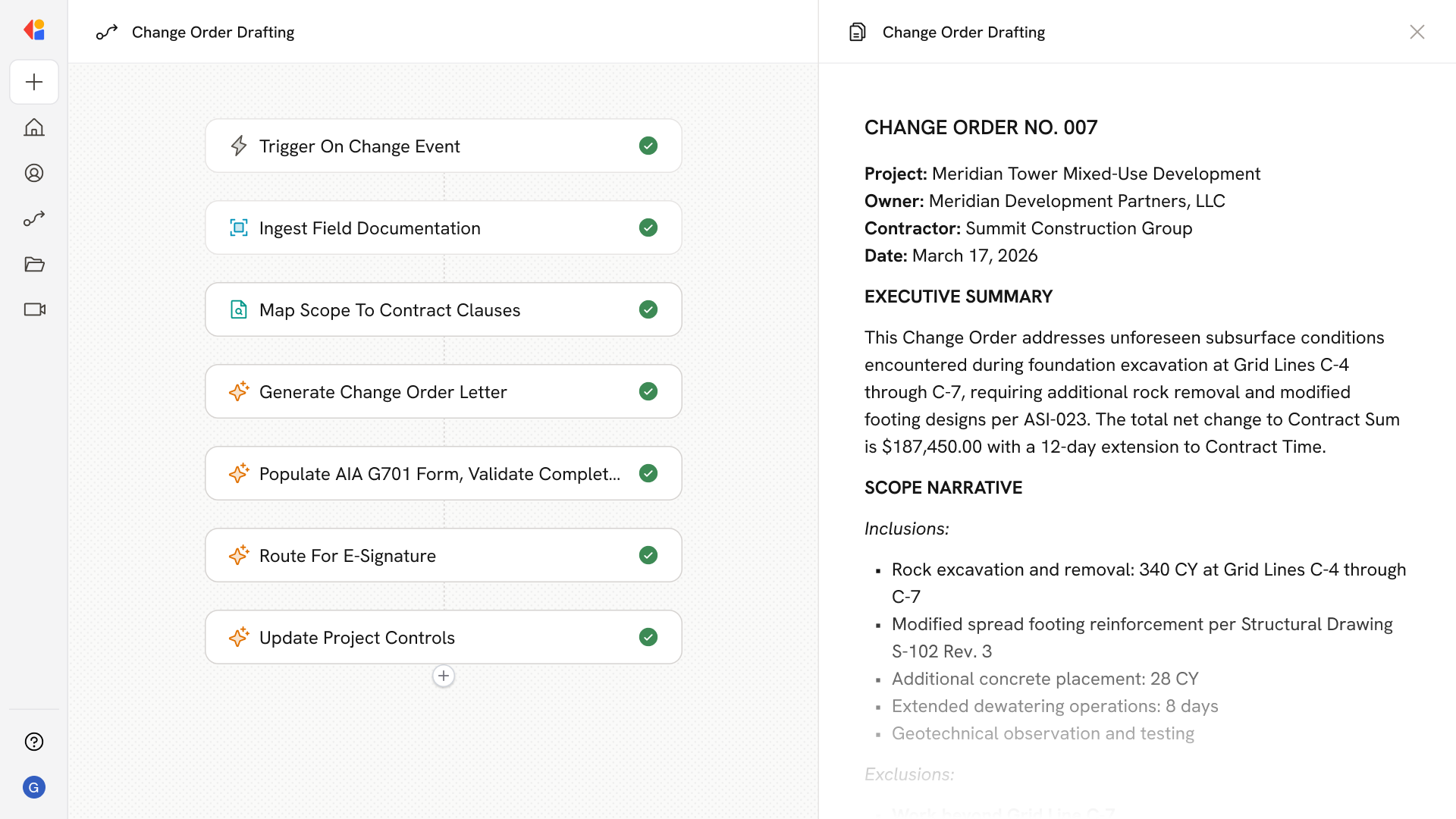
Step 1: Trigger on change event identification
The Workflow activates when a change event enters the system—whether from an RFI clarification, Architect's Supplemental Instruction, Construction Change Directive, differing site condition report, or field-captured T&M ticket.
Step 2: Ingest and organize field documentation
Cassidy pulls relevant artifacts from your Knowledge Base and connected systems: contract documents (AIA A201, prime agreement exhibits), prior change orders, drawings with delta revisions, T&M tags, daily logs, photos, and vendor quotes.
Step 3: Map scope to contract clauses and documents
The Agent analyzes the change event and maps each scope element to specific AIA clauses (§7 for changes, §15 for notice/claims), drawing sheets, spec sections, and reference documents—flagging notice windows and required sign-offs.
Step 4: Generate clause-mapped change order letter
Cassidy drafts a complete change order cover memo with executive summary, detailed scope narrative (inclusions/exclusions), contractual basis, pricing summary tied to cost codes and SOV, schedule impact statement, and a checklist of attachments.
Step 5: Auto-populate AIA G701 form
The Workflow populates the AIA G701 Change Order form with project details, CO number, scope description, net change to Contract Sum, adjusted totals, Contract Time adjustments, and new Substantial Completion date—producing a locked PDF ready for execution.
Step 6: Assemble pricing and schedule exhibits
Cassidy compiles the detailed cost breakdown—labor with burdens, equipment rates, materials, subcontractor quotes, extended general conditions, and OH&P per contract caps—alongside a fragnet or narrative schedule impact exhibit with requested time extension days.
Step 7: Validate completeness and prevent errors
Before routing, the Agent runs a QA checklist: verifying T&M sign-offs are complete, checking for double-counting against existing PCOs, confirming alignment to cost codes and SOV, and flagging any missing backup documentation.
Step 8: Route for e-signature in contract sequence
Cassidy sends the assembled package through your e-sign platform (DocuSign, Adobe Sign) with ordered signers per contract requirements, attaching all exhibits and capturing a timestamped audit trail.
Step 9: Update project controls and downstream systems
Once executed, the Workflow pushes the change order values to your change log, budget, prime contract, subcontractor change orders, pay applications, and schedule controls—keeping ERP and project management systems synchronized.
Implement it inside your company
- Hands-on onboarding and support
- Self-paced training for your team
- Dedicated implementation experts
- Ongoing use case discovery
- ROI tracking & analytics dashboards
- Proven playbooks to get started fast