
6,000
80%
90%+
8 months
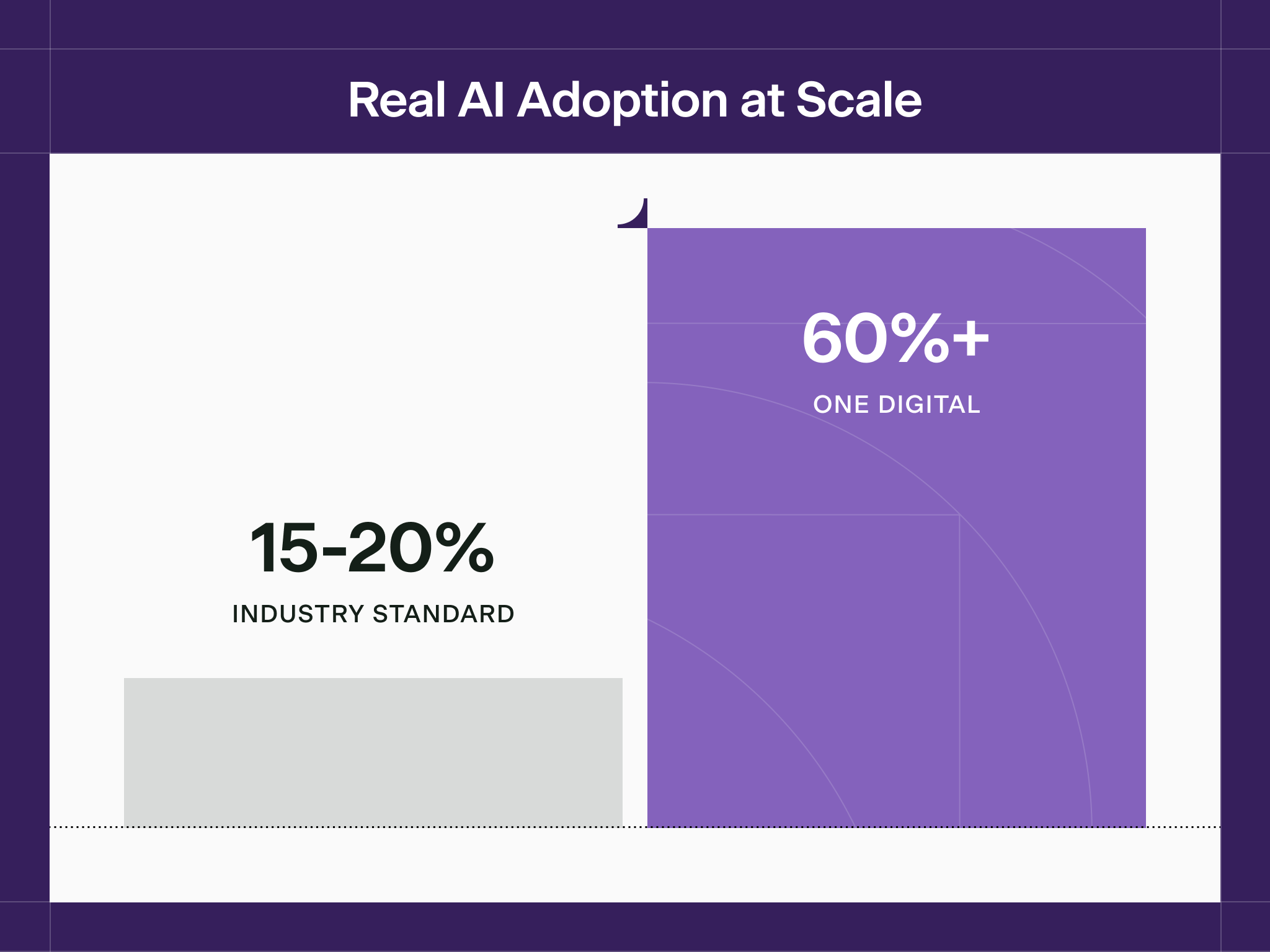
The industry average for enterprise AI adoption is 15–20%. OneDigital is at 60%+ firmwide, with some practices past 84% — reached in six months. The difference was managing AI like a workforce.
OneDigital is a leading insurance, financial services, and human capital management firm, with practices spanning employee benefits, property and casualty, retirement, executive compensation, and HR and workforce consulting. Their reputation is built on judgment-heavy advisory work — the kind that's hard to scale across thousands of practitioners without losing quality.
That scaling challenge is exactly why OneDigital turned to AI. And it's exactly why the numbers above are unusual. Most companies buy a platform, flip a switch, grant access, announce it, and watch adoption plateau within months. OneDigital had already lived that story once, with a previous AI vendor, before they found a different way to do it.
A Familiar Pattern: The Bottleneck That Stops Most AI Rollouts
OneDigital's first AI platform ran on a simple model: practice leaders submitted change requests to a central technical team, then waited. A retirement leader who wanted their AI to handle a new type of plan document filed a ticket. So did a benefits leader who wanted a different tone in client emails. Both went into the same queue, moving on its own schedule — not theirs. The people who understood the work best had no direct way to act on that understanding.
Employees kept experimenting with AI on their own anyway, which told OneDigital something useful: people wanted this to work. Durable, firmwide adoption required practice leaders with real authority to manage their own coworkers directly.
The Turning Point: A Different Question About Managing AI
OneDigital's leadership focused on a different question than most companies ask: figuring out how to manage AI once you have it — the question most companies skip. Their insight: managing AI is a talent management function.
"Every AI vendor promises the same thing: turn it on, and adoption takes care of itself. We tried that with our first platform, and it didn't work. That's what got us to a coworker instead of a tool — something hired for one job, not switched on for everyone at once. It starts as an intern, learns from the person who's actually good at that job, and only earns its way to the rest of the team once it's proven it belongs there."
— Robin Singhvi, Director of AI Programs, OneDigital
That insight became the model. OneDigital built a roster of named AI Coworkers — one for every practice, each a specialist with a human supervisor accountable for its performance. Each one is treated like a colleague with a defined role.
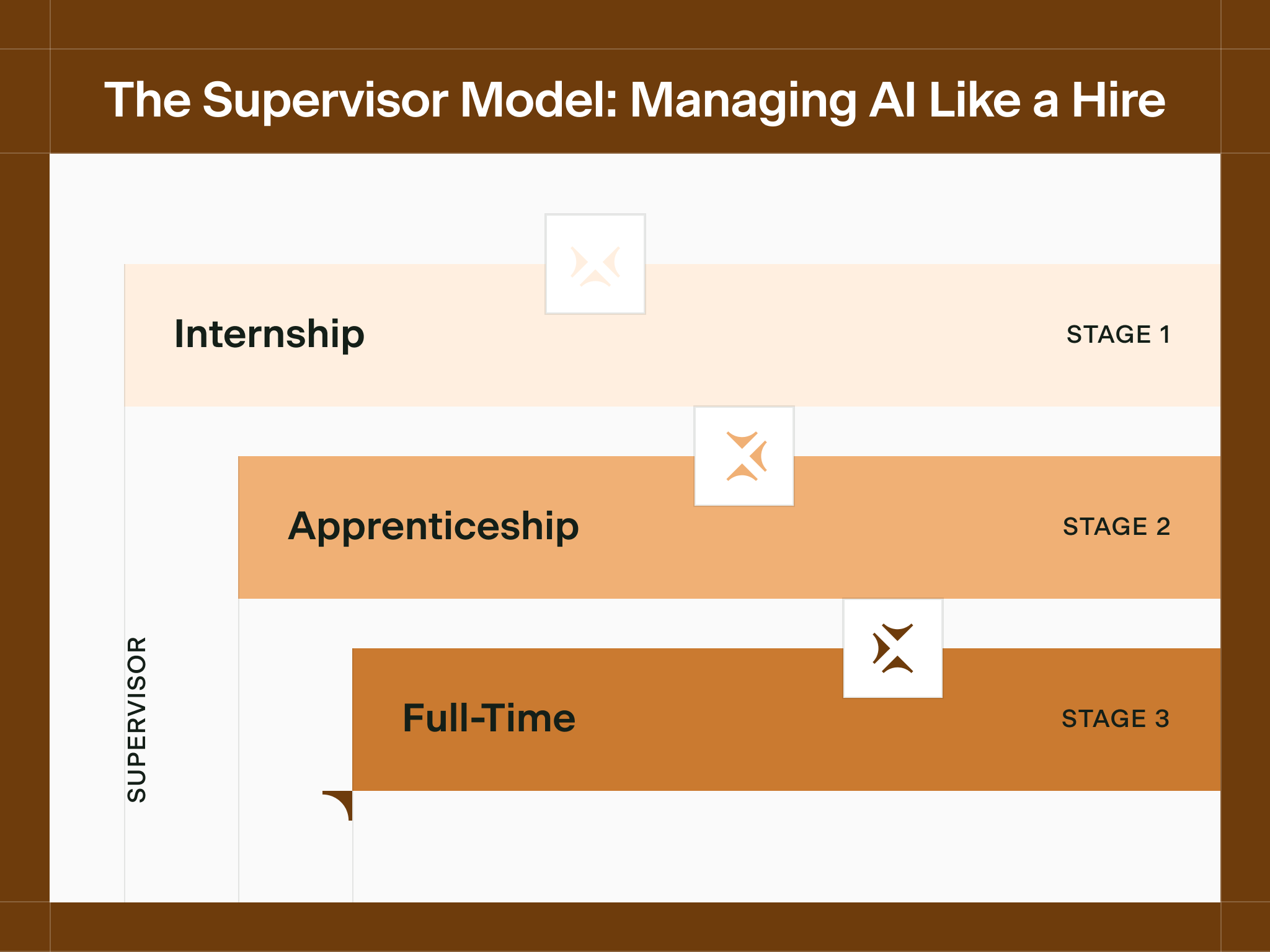
Every coworker moves through the same three-phase arc as a new hire. During internship, a narrow cohort stress-tests the coworker while the supervisor refines its Knowledge Base and tunes its instructions — it isn't available to the broader team yet. During apprenticeship, it takes on real work with real stakes, and supervisor feedback has teeth. By full-time, it's available to the whole practice, with quarterly performance reviews and a "resume" that tracks its skills and updates as it develops new capabilities.
The Proof: How Thirty Years Of Expertise Scales
Shelley McLean is National Growth Strategist for OneDigital's employee benefits practice, the firm's largest business segment, and brings three decades of benefits expertise to the role. She supervises Ben, the AI Coworker built for employee benefits. In Cassidy, she curates Ben's Knowledge Base directly — no IT tickets, no waiting — tunes his instructions when she notices a gap, and runs quarterly reviews using usage and quality data from Cassidy's dashboards. When she makes a change and it doesn't land right, she can see exactly what changed and roll it back, which is what gives a non-technical supervisor the confidence to keep experimenting.
The effect shows up on the other side of that work: a consultant in any office can get Ben's help at 10pm before a client meeting, backed by thirty years of judgment it would otherwise take a career to build.
"Everything I've learned in 30 years is in Ben's Knowledge Base now. I don't think of it as managing software — I think of it as making sure Ben has the same judgment I'd want any consultant on my team to have, and that gets better every time I correct something. That means a consultant who's been here six months can walk into a client meeting with the same grounding it took me decades to build."
— Shelley McLean, National Growth Strategist, OneDigital
The same pattern repeats across the firm. Scott P'Pool supervises Quinn in Property & Casualty — an internal prep tool that structures and compares insurance quotes so nothing gets missed, though it stays out of client-facing work by design. Jarrod Church supervises Finn in Wealth, where the stakes are higher: Finn supports the advisor's analysis but never substitutes for their judgment, and recommendations and client communication stay the advisor's responsibility given the sensitivity of the data. And Ace, available to every employee, handles the everyday work — emails, HR questions, carrier lookups — that doesn't need a specialist.
"Quinn and DEX have transformed the P&C world. We're making changes that people from other agencies can't believe — what light speed we are ahead of them."
— Scott P'Pool, Property & Casualty Practice Leader, OneDigital
More than 10 coworkers are live across every major practice today, with 10+ more in development, each following the same lifecycle and each living inside the tools people already use — Outlook, Excel, Word, Teams — so getting help never means leaving the workflow to log into something separate.
The Payoff: What Adoption Actually Looks Like At Scale
The number that matters most isn't a percentage — it's what happens when a model like this actually holds at scale. Six months after rollout, OneDigital had onboarded 6,000 employees, reached 75%+ adoption across the entire firm, and watched some practices climb past 84% and keep rising. Most of that 6,000-person workforce, years into established ways of working, now uses an AI Coworker as part of their daily routine.
A Platform Built Around How OneDigital Works
The supervisor model only works if the right people can actually shape a coworker — not just use it, but train it, correct it, and improve it as they learn what works. That's the same challenge that held back OneDigital's first AI platform: practice leaders had ideas about how their coworker should think and respond, but no direct way to act on them. Every change ran through a central team and a queue that moved on its own schedule.
Cassidy solved that by giving the people doing the work direct access to the product itself. Supervisors like Shelley and Scott needed to update a Knowledge Base, tune an instruction, or correct an answer the moment they noticed it — not file a request and wait. Rather than fit OneDigital into an existing framework, Cassidy built the model around how the firm actually operates: practice leaders with direct, hands-on control over the coworkers they're responsible for, day to day.
"What we've always cared about is giving our people the ability to do great work — and the Cassidy team understood that from the start. They helped us take decades of experience from people like Shelley and Scott and turn it into something the next person who joins the team can tap into on day one."
— Robin Singhvi, Director of AI Programs, OneDigital
A Framework Built To Grow With The Firm
OneDigital calls this framework Workforce Intelligence — the idea that companies who win with AI manage it like a workforce, not a software deployment. It's repeatable because it's a management approach, not a one-time deployment: as OneDigital grows and acquires, new practices get new coworkers, each on the same lifecycle.
For enterprise leaders evaluating AI, OneDigital offers a different question to ask. Not "which platform should we buy?" but "how will we manage AI once we have it?"
The answer to that question determines whether AI becomes another shelfware investment or the foundation of how work gets done.
Ready to Build Your AI Workforce?
OneDigital proved that enterprise AI adoption is a management opportunity, not a technology challenge. Cassidy provides the infrastructure that lets non-technical leaders build, supervise, and continuously improve AI Coworkers across their organization.
Book a demo to see how Cassidy can work for your team.
Read more success stories




FAQ
No. Your data stays private. Cassidy never uses your data to train AI models—it's used solely to provide context for your automations. Review our security center here.
Cassidy syncs with your external data sources, so your Knowledge Base always reflects the latest versions of your files. To maintain accuracy over time, we also offer Document Verification—allowing your team to flag potentially outdated content for review, so Agents only rely on verified information.
Yes. Cassidy can be deployed through Slack and Microsoft Teams, as well as via Chrome, Word, Excel, and Outlook extensions. This allows you to use Cassidy directly within the tools your team works in every day.
Cassidy is SOC 2 Type II, GDPR, HIPAA, and CASA certified. All data is encrypted in transit and at rest, with granular, role-based access controls. Review our security center here.
Cassidy is an automation platform built to power real business processes—not just simple workflows.
- Deep Business Context: Cassidy connects to your company's unique data through our Knowledge Base, understanding your specific processes, terminology, and brand voice.
- Ease of Use: No developers required. Our no-code platform lets non-technical teams stand up Workflows and Agents in hours, not months.
- Enterprise Support: Our dedicated solutions team partners with you to design, build, and refine Agents that deliver real ROI.
See how Cassidy compares to other tools in our Blog here.
Teams at startups and Fortune 100 enterprises alike use Cassidy to automate critical workflows. Explore hundreds of examples in our Use Case Library.
Common applications include:
- Sales: Get complete context with deal and customer Q&A, auto-update CRM fields after calls, draft RFP responses from approved answers, and enrich leads automatically.
- Customer Support: Empower agents to answer technical questions, auto-draft replies to incoming tickets, triage and route tickets to the right team, and turn resolved tickets into help articles.
- Marketing: Create SEO content at scale in your brand voice, repurpose content across channels, check content against style guides, and track competitors.
- Operations: Enable instant internal answer search for employees, guide new hires with role-aware onboarding, analyze operational data for bottlenecks, and generate SOPs from existing processes.
Yes. Cassidy integrates with hundreds of tools across your stack. We offer native integrations for Knowledge Sources (like Google Drive, SharePoint, and OneDrive) and Workflow Actions (like updating Salesforce or sending Microsoft Teams messages). For custom needs, connect to virtually any app using webhooks and our API. Explore all our integrations on our Integrations page here.
